 AI CREATOR LAB
the official Fanvue AI creator program*
📓 Workbook
AI CREATOR LAB
the official Fanvue AI creator program*
📓 Workbook
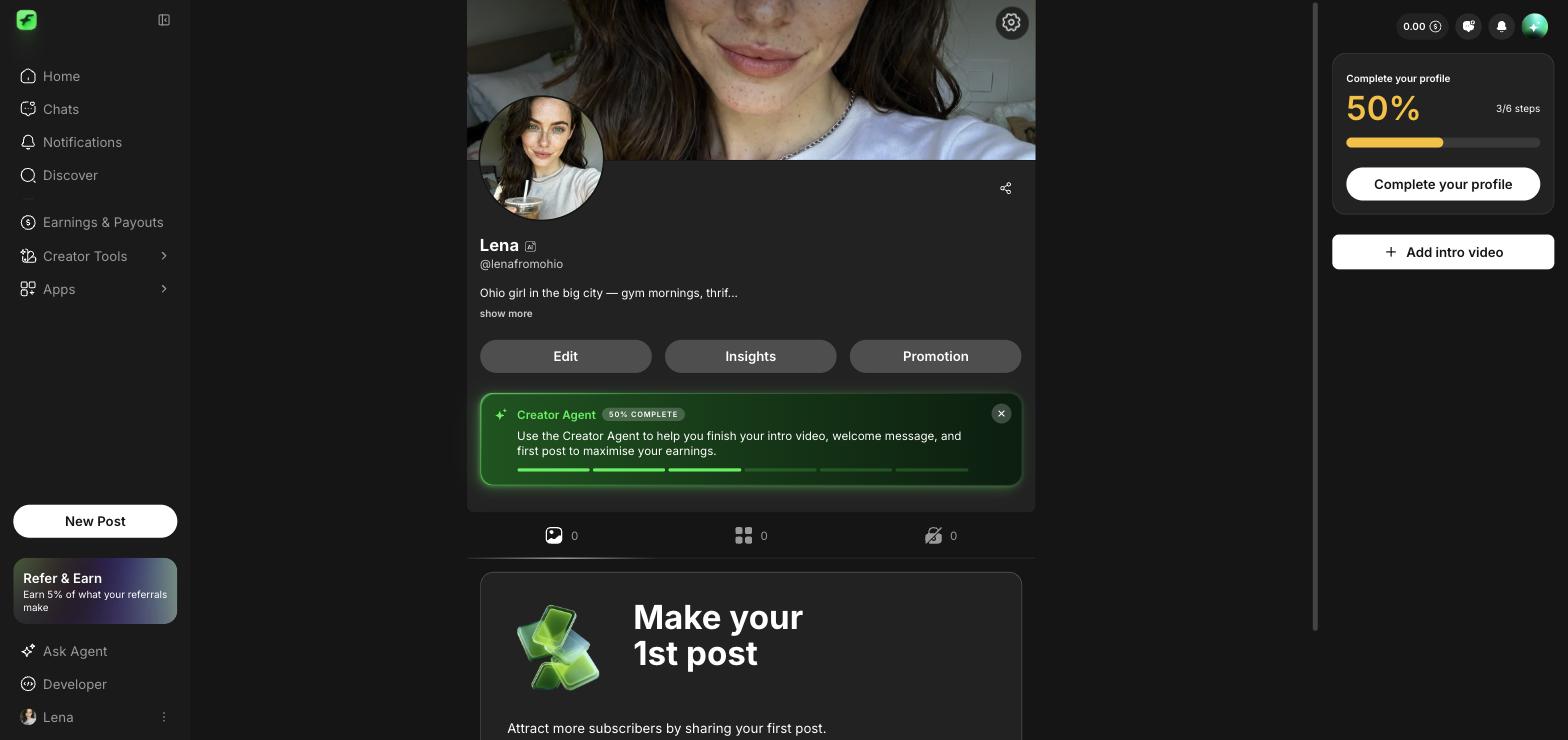
Her page looks like a creator worth following: real avatar, real banner, a bio in her voice, and a subscription price. When traffic shows up, the storefront is ready.
A visitor decides in about three seconds: is this account real, active, and worth it? Empty profiles convert nobody — and every visitor you send there later costs you effort or money. We're doing this before traffic exists so no click is ever wasted. Profile first, promotion after. Always.
Avatar: the image you downloaded in 2.1. Face clearly visible, cropped chest-up. Upload it in her Fanvue profile settings. (On desktop it's in your Downloads folder; on your phone it's in the photo roll.) Same face everywhere from now on — this exact image becomes her social avatar too.
Banner: your second-best keeper — or shoot a purpose-made one: Create → same recipe → Aspect Wide → 1 image (5 credits). Purpose-shot banners beat cropped portraits. If credits are tight, the second keeper works fine today.
Bio: three lines, from the persona sheet. The pattern:
[Your bio line from the persona sheet]
   New here — posting [what she posts] every day 💛
   Subscribe and say hi, I answer everything 💬
Her voice, no essay, no fake scarcity. Five minutes maximum — bios are editable forever.
Confirm her AI-creator badge shows on the profile (you declared it in Lesson 1.3). It should just be there — this is a 10-second glance, not a task.
Set her subscription price: {{COPY: starter sub price — pending pricing lesson data}}.
low on purpose. A new page earns trust with an easy yes; you raise prices when the feed proves itself. Real pricing strategy gets its own lesson in Phase 6 — today's number just makes the page functional.
Bio not landing? Second opinion, her voice preserved:
~20 minutes.
Her profile has all five jobs done — avatar, banner, bio, AI badge, sub price — and it passed your own stranger test. Post the screenshot; the coaches spot-check these and it's half the fun of the channel.
The one where her face reads clearest as a thumbnail. Zoom your phone way out — whichever is still recognizable at coin size wins. Two minutes, maximum.
Don't fight the crop — generate a Wide shot (same recipe, Aspect: Wide, 1 image). If you're out of credits, second keeper today, purpose-shot banner next week.
Fill it with HER specifics — hometown, thing she's into, posting rhythm. The pattern is generic; the content isn't. And remember it's editable forever: done beats perfect.
No. Those are monetization tools and they come in Phase 6, where they earn. Today's only job: the page looks alive.
Platforms update their UI. The five jobs never change: avatar, banner, bio, AI badge, sub price — find each in profile settings, and drop a note in #course-help so we refresh the lesson for the next student.
Storefront's open. Tomorrow is the day everything's been building to — publish day. Her first post goes live. Milestone lesson. Sleep well.