 AI CREATOR LAB
the official Fanvue AI creator program*
AI CREATOR LAB
the official Fanvue AI creator program*
By the end of this lesson you will have:
One expectation to set before you start: every creator who made it past month one published a first post they thought was embarrassing. The ones who quit never published. Today's post does not need to be good. It needs to be live.
In every program like this, the people who publish early are the ones who finish. Momentum beats perfection, every time. A live page with one post beats a perfect page with zero, because one is a business and the other is a plan. Publishing is the habit, and today we install it.
Most people wait to feel ready. Readiness comes after publishing, and nothing about her page becomes more ready by delaying. The support system below is built around you doing this today.
The first post is free, on purpose. An empty page has no trust to charge against yet. Paid unlocks work once a feed and trust exist behind them, and Phase 5 teaches them properly, starting at lesson 5-1 (Pricing Her Right). In this system the first post is free, always.
This is also a tracked milestone. First publish is Milestone 4, the one the support system watches hardest. The target is to publish within three days of the evening you started lesson 0-1 (Welcome & the Money Map): Phase 0 on evening one, Phase 1 on evening two, publish on evening three. If you miss the window, a human coach reaches out to help you across.
Nothing in this lesson is new ground. You already made the content and the storefront. Today is ten minutes of clicking.
Publishing happens in Bopgpt, and the post appears on her Fanvue page. The wiring already exists: you connected Bopgpt to her Fanvue account in lesson 1-3 (Connect Bopgpt to Fanvue), and that connection is what lets Bopgpt publish for her. Step 2 confirms it before anything goes out.
The publish form: when you select photos and choose Publish to Fanvue, Bopgpt opens a form with three controls that matter today.
Today's answers are her account, free to everyone, publish now. Scheduled and queued posts are created on Fanvue directly, and you can always see or edit them there.
Which photos: 1 or 2 keepers from your lesson 2-1 (Your First AI Photoshoot) shoot, and never the avatar. Fans already see the avatar on every visit, so feed content must be new to them. The avatar is the only reserved photo; reusing the banner keeper in a post is fine.
The publish form opens with your selected photos in it.
Confirm the publish target is her account. In Bopgpt, on the publish form: the Publish as field should already show your creator's name and avatar, because hers is the account you connected in lesson 1-3 (Connect Bopgpt to Fanvue). If anything else shows, stop. Open Settings, then Connections, and reconnect per lesson 1-3 (Connect Bopgpt to Fanvue) before publishing.
Write the caption yourself: one line plus a question. In Bopgpt, on the publish form: type the caption by hand. The form shows a Write caption AI button; skip it today, because her first words should be yours. The AI caption tool is taught in Phase 3. End with a question, because questions train fans to talk, and talking is where the money is made later (lesson 5-3 (How Chatting Works) is built on it).
Example, Lena's first caption:
first one on here… be nice 🙈 what should tomorrow's be?
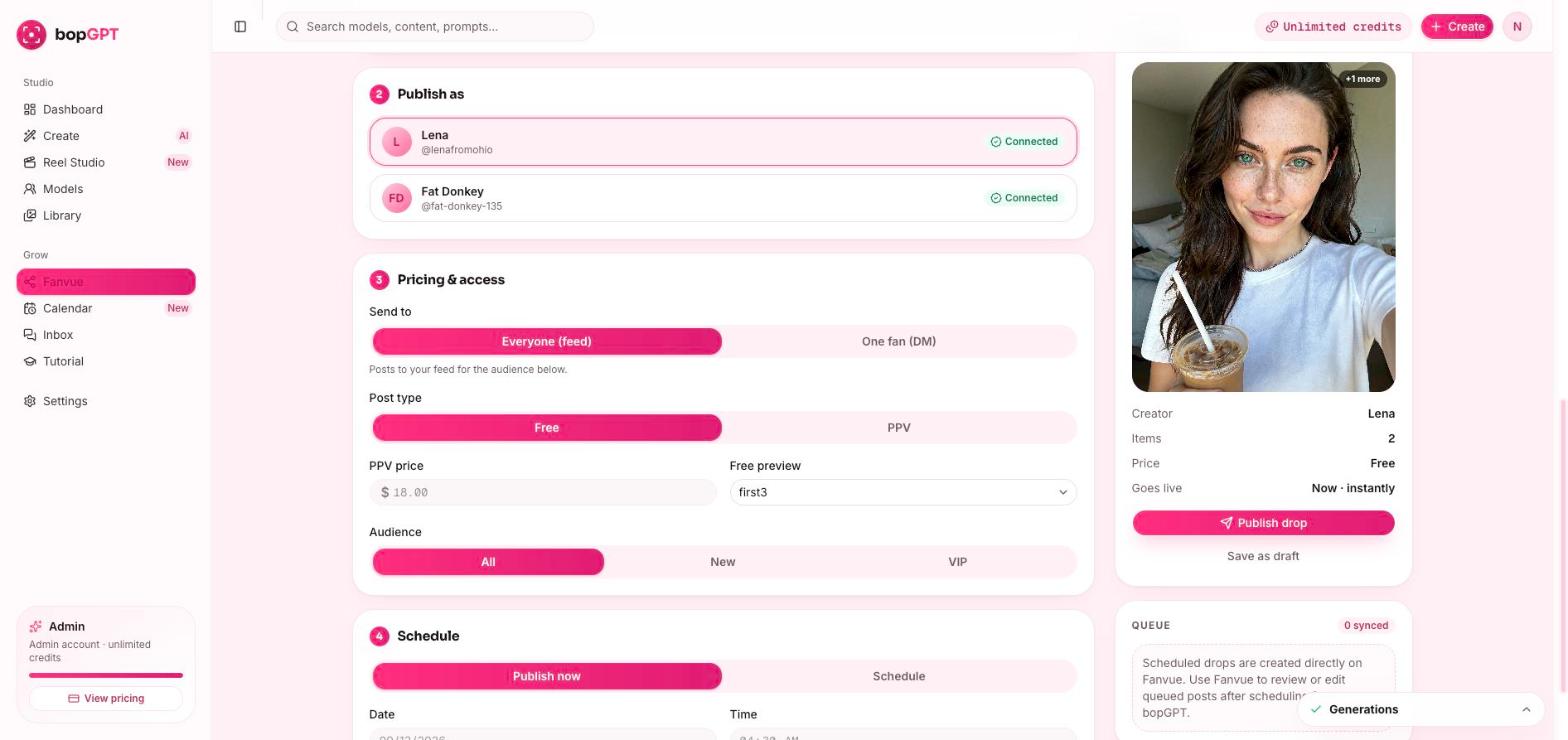
Publish now and confirm the dialog. In Bopgpt: click Publish now. A confirmation dialog appears, and the dialog is the real send, so confirm it. If you clicked Publish and nothing seemed to happen, the dialog is what happened. Confirm it and the form clears.
Open her page and look at the post. On Fanvue: open her page. Her first post is live, on a page any stranger on the internet can visit. Take the screenshot for #wins while you are there. Then glance at the post's day-one view and like counts, which will probably sit near zero, and that is the point: the numbers stay on the post permanently, and they are the baseline every later "is this working?" question gets measured against.
Reply to anything that happens in the first 24 hours. On Fanvue: if anyone comments or follows today, reply the same day. The earliest arrivals are disproportionately the people who become her first payers.
First comment lands and your mind goes blank? Paste this into Bopgpt's AI chat tab:
Here are my creator's details: [paste her details]. A fan just commented on her very
   first post: "[paste comment]". Draft 3 short reply options in HER voice —
   warm, casual, one emoji max, and each ending in a way that invites another
   message. No thanking them like a brand would.
Her Fanvue page shows a live post. A post queued pending verification counts too; flag a coach in #course-help to confirm. This is Milestone 4, first publish. Mark the lesson complete.
Check the connection. In Bopgpt, Settings then Connections should show your creator. If it does not, reconnect per lesson 1-3 (Connect Bopgpt to Fanvue) and retry.
Your post may queue until verification clears, and a queued post still counts for today. Flag it in #course-help so a coach confirms your milestone. The post should go live automatically when verification does.
Everyone who has built one of these felt exactly that on this exact day. First posts read worse to their maker than to anyone else. Publish, then message a coach saying you did, and we will tell you the same thing with your name on it.
No. The first post is free, always, in this system. PPV means pay-per-view: any post or message a fan pays to unlock. PPV works when trust and a feed exist behind it, and Phase 5 teaches it properly, starting at lesson 5-2 (The Content Ladder).
Two moves, and neither is promotion: reply same-day to any comment or follow, and glance at the day-one numbers if you skipped that in step 6. If Fanvue offers a pin-post option, this post with its warm caption is the natural pin until the feed fills. What you do not do is blast the link anywhere. Traffic gets its own phase, and sending strangers to a one-post page wastes them.
The call is celebration. Your milestone is the live post plus the #wins post, and both are done. Coaches read every #wins entry whether you attend or not. Replays: coming soon.
She is live on the platform that pays. The next lesson takes fifteen minutes: you plant her flag on social, the account that feeds her traffic later, and Phase 2 is done. Tonight if you have the energy, tomorrow evening if you don't. Both are on pace.